|
Release date: September 30, 2025
Nextivity is thrilled to announce the release of WAVE Portal version 1.8.0, and with it the launch of a highly-requested new feature of our WAVE platform: Customer Portal. Read below to learn more about this new capability, and the other exciting changes included in this release:
New Site: Customer Portal
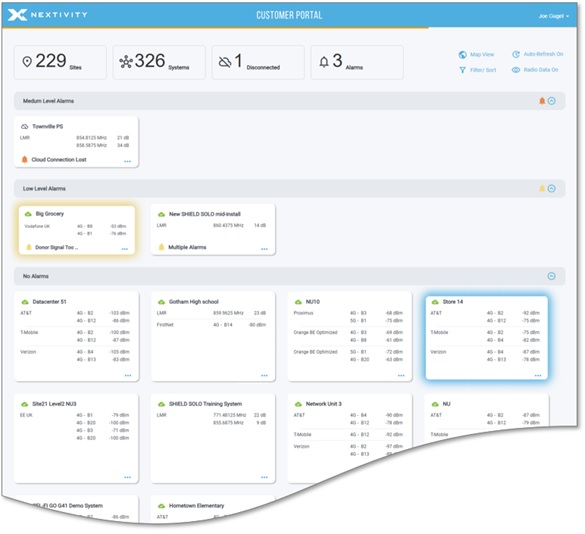
Built on the same platform as the WAVE Portal, the Customer Portal is a new site that provides end users with visibility into the current status of their Nextivity equipment. It is designed with enterprise users in mind (those that have multiple sites and systems, potentially installed by several different companies across many regional areas) and provides users at-a-glance reassurance that their equipment is operating as expected.
Users receive access to the Customer Portal from their System Integrator. The SI partner grants an end user read-only access to view their system, and is able to control the amount of information shared. When the user logs into the Customer Portal, they are greeted with a new purpose-built Customer Dashboard addressing all systems they've been granted visibility to by their installers.
An example of the Customer Portal Dashboard is shown here:
Nextivity built the Customer Portal to support our installer partners' success and improve end user experience. Use it to meet RFP requirements common for large, multi-site enterprise deals requiring a tailored NOC experience, or to expand the support and service offerings made as part of a complete Nextivity solution.
The Customer Portal becomes available with the release of WAVE Portal 1.8.0. Please continue reading the Customer Access section below for information on how WAVE Portal users manage customer users and shared systems.
For more information regarding the Customer Portal user experience, see customer user article, Introducing the Customer Portal.
New Feature: Customer Access Management
Managing customer users and their ability to see a system in the Customer Portal is handled within the WAVE Portal. With the release of version 1.8.0, WAVE Portal users assigned to the Administrator role for their organization will now see a new menu option: Customer Access
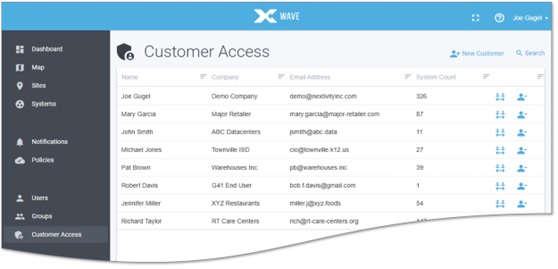
Customer Access lists all the customer users your company has created and the number of systems you've shared with them. You can select an existing user to review, add or remove systems from their view, or change their Visibility Level for a particular system. It's easy to create a new customer and bulk-share their systems, or clone an existing customer user – for example, if they have a new coworker that needs the same Customer Portal experience. And of course the "Revoke All" option immediately removes all the visibility grants your company has given to the user.
Individual systems can also have their customer grants managed from the Manage Access menu on the System page, so a system can be shared with all relevant customer users – right after it's commissioned, or whenever needed. This new self-service capability puts the Nextivity partner in control, and provides three "Visibility Level" options that determine the user's Customer Portal experience. These options are all read-only, and include:
-
Basic: System is only visibility on the Dashboard, providing a summary of any active alarms, Cloud Connectivity status, and the most recent power levels.
-
Overview: Read-only access to the System Page with asset details and most recent measurement for all metrics.
-
Detail: In addition to Overview, the customer user gains access to historical radio data reports and alarm history.
For more information about the Customer Portal and Customer Access Management, please see the Partner Portal article, Customer Portal Overview.
There you will find additional details, a recording of the partner webinar announcing the Customer Portal, and FAQ covering the key features of both the Customer Portal site and the Customer Access management process.
New Product: CEL-FI QUATRA 100M
Support has been added for Nextivity's newest product, the CEL-FI QUATRA 100M, coming first to the European market. Designed to solve in-building coverage challenges for the middleprise, the QUATRA 100M delivers a versatile, carrier-grade experience for signals up to 100MHz in either public cellular or the evolving private 5G network market.
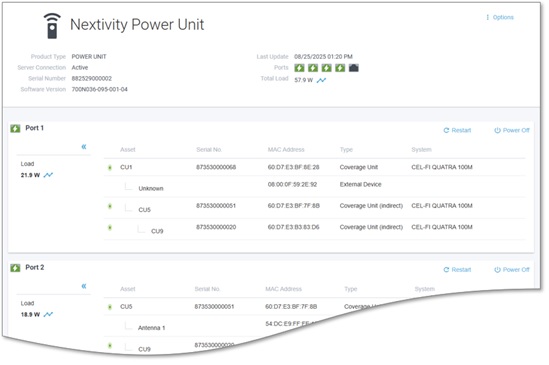
The QUATRA 100M system introduces a new type of device for CEL-FI systems, a Power Unit (PU). Illustrated below, the PU provides a new method of remote power management. As part of a QUATRA 100M system, the PU is not separately commissioned. It automatically becomes associated with the system it is powering.
Partners in EMEA should please visit Nextivity University and the Partner Portal for more information about these exciting new products, the QUATRA 100M and Power Unit.
New Feature: SNMP for SHIELD
We are pleased to announce that the SHIELD product line now includes an SNMP Agent feature. This is available on both SHIELD EXTEND and SHIELD SOLO systems, for new installations and existing installs with WAVE Portal connectivity.
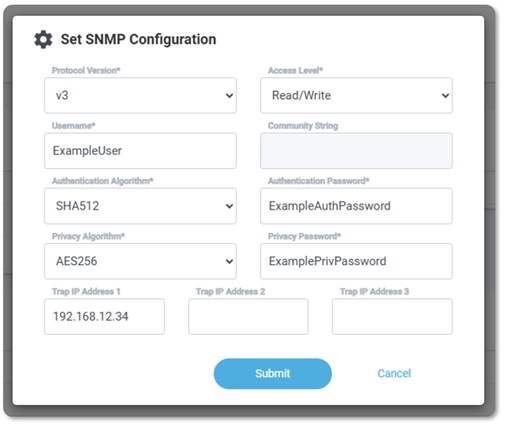
The SNMP Agent is included in the latest MU software release, version 11. To use this feature, the SHIELD MU must have an outbound connection to the WAVE Cloud platform, to configure and manage the SNMP Agent within the system. This new feature is available on the Options menu on the MU page, illustrated below.
Please see this article for more information, Configuring a SHIELD System for SNMP.
Other Improvements:
-
"System Not Online" Alarm Name Change: Based on user feedback, the name of this alarm has been changed to "Cloud Connection Lost" to reduce potential confusion regarding its meaning. This alarm continues to convey that WAVE Cloud's connection to the system has lapsed, and does not imply any change to the relay state of the system itself. The updated alarm name better conveys this distinction. "Cloud Connection Lost" is now used for all future and historical instances of this alarm event.
-
URL Updated: The primary URL for the WAVE Portal is now wave.nextivityinc.com. The old address (wave.cel-fi.com) will continue to work for the indefinite future. Both addresses can be used to access either the WAVE Portal or the new Customer Portal.
-
Last Login Info: Account administrators are now able to see the Last Login date and time for the users within their organization, found in the Users list and on each user's Profile page.
-
Role in Users List: The Users list now includes the Role assignment for each user, making it easier for account administrators to identify which users are assigned to which role.
-
Map Page Regional Centering: The Map page will now automatically center on your region when it loads. Previously, the page always loaded focused on North America. The map now loads centered where the majority of your organization's systems are installed.
- Other minor text and tooltip improvements.
Issues Resolved:
- Resolved an issue causing the Industrial Conversion option not to appear for some QUATRA 4000c systems.
- The last-reported SINR and DAQ values will no longer be displayed on the Radio Data pages for SHIELD systems when the downlink has been lost.
- The IP Address shown on the System Detail page for a SHIELD system now reflects the appropriate address, that of the MU WAN port connection, provided the MU software is updated to version 11 or later.
- The SHIELD MU page now displays the correct (Ah) label for Battery Capacity.
- Removed unavailable options mistakenly displayed on the Settings pages for ROAM R41 and CONNECT C41 systems. Specifically, the "Auto update", "Daily maintenance cycle", and "Mandatory connection" options are not available for these models.
- Other minor bugfixes.
See also: Prior release, Version 1.7.7
|
